

• About Us
  • Privacy Policy
  • DMCA
  • Editorial Policy
  • Contact Form
Friday, December 5, 2025
  • Login
No Result
View All Result
NEWSLETTER
BOB fm
  • Home
  • Top News
  • World
  • Economy
  • science
  • Technology
  • sport
  • entertainment
  • Contact Form
  • Home
  • Top News
  • World
  • Economy
  • science
  • Technology
  • sport
  • entertainment
  • Contact Form
No Result
View All Result
BOB fm
No Result
View All Result
Home Tech

Switch Chrome search engine on Android and leave Google

CrystalNomad by CrystalNomad
June 10, 2021
in Tech
0
Switch Chrome search engine on Android and leave Google
0
SHARES
138
VIEWS
Share on FacebookShare on Twitter

Google is the center of Android and all the apps and services that this operating system accesses. It is, among other things, the search engine used not only in the system, but also in the primary browser, Chrome.

Since not everyone wants to use this suggestion from Google, it is easy to change the specific search engine in Chrome. Today we show you how they can do this, using one of the suggestions provided in the Android browser.

pub

Google is the default search engine for the Internet. It's what the competition is trying to emulate and everyone is used to it, even if often indirectly or without realizing it. It seems that this is the Internet standard, which not everyone wants.

With all the privacy issues that exist, many would like to give up on Google with alternatives. Thus, Chrome on Android allows to change the search engine used in the browser. This is a quick process that any user can easily do.

Google Chrome Android Search Engine


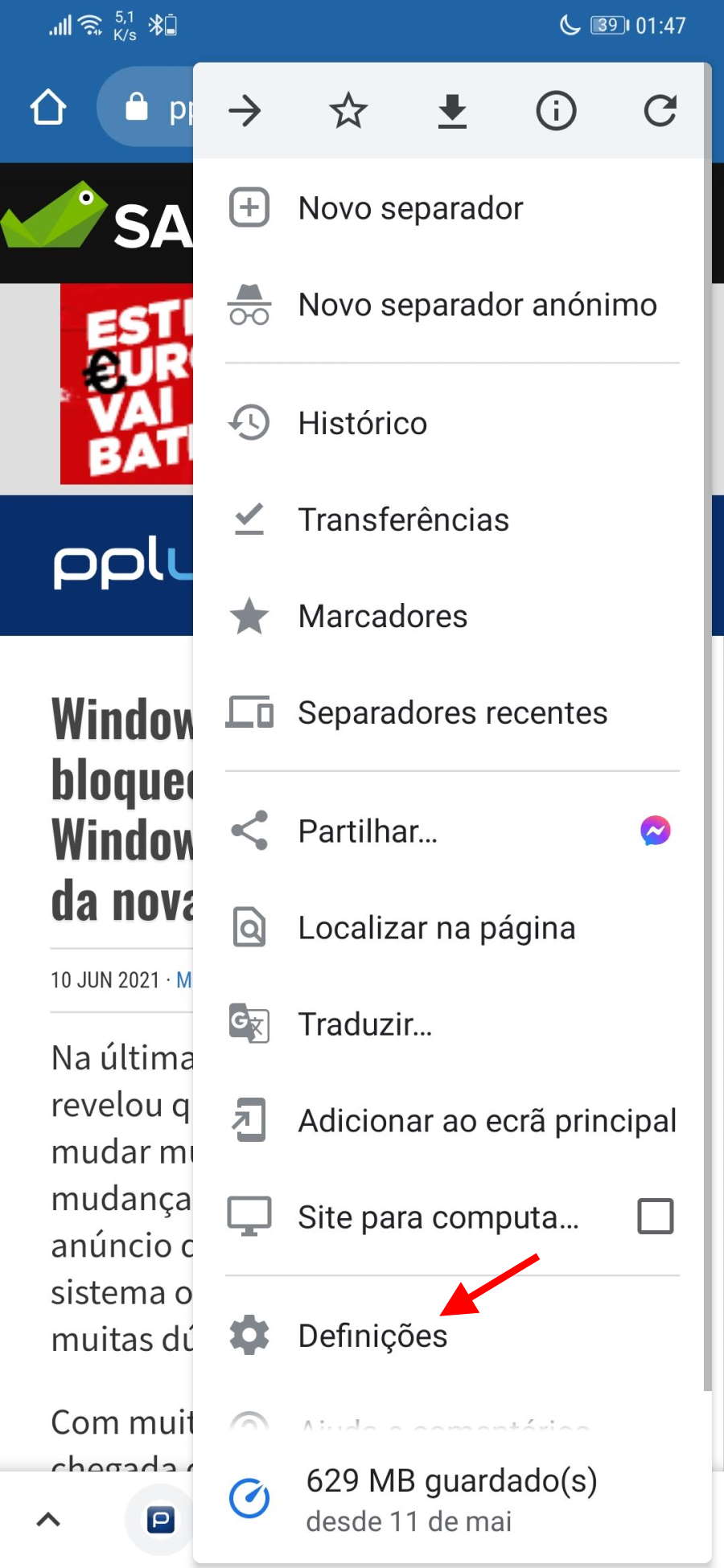
This process is performed inside Android Chrome, so you have to open this browser on your smartphone. Here, you have to open the browser menu, which can be accessed through 3 dots at the top. Here, you should choose the Settings option near the end.

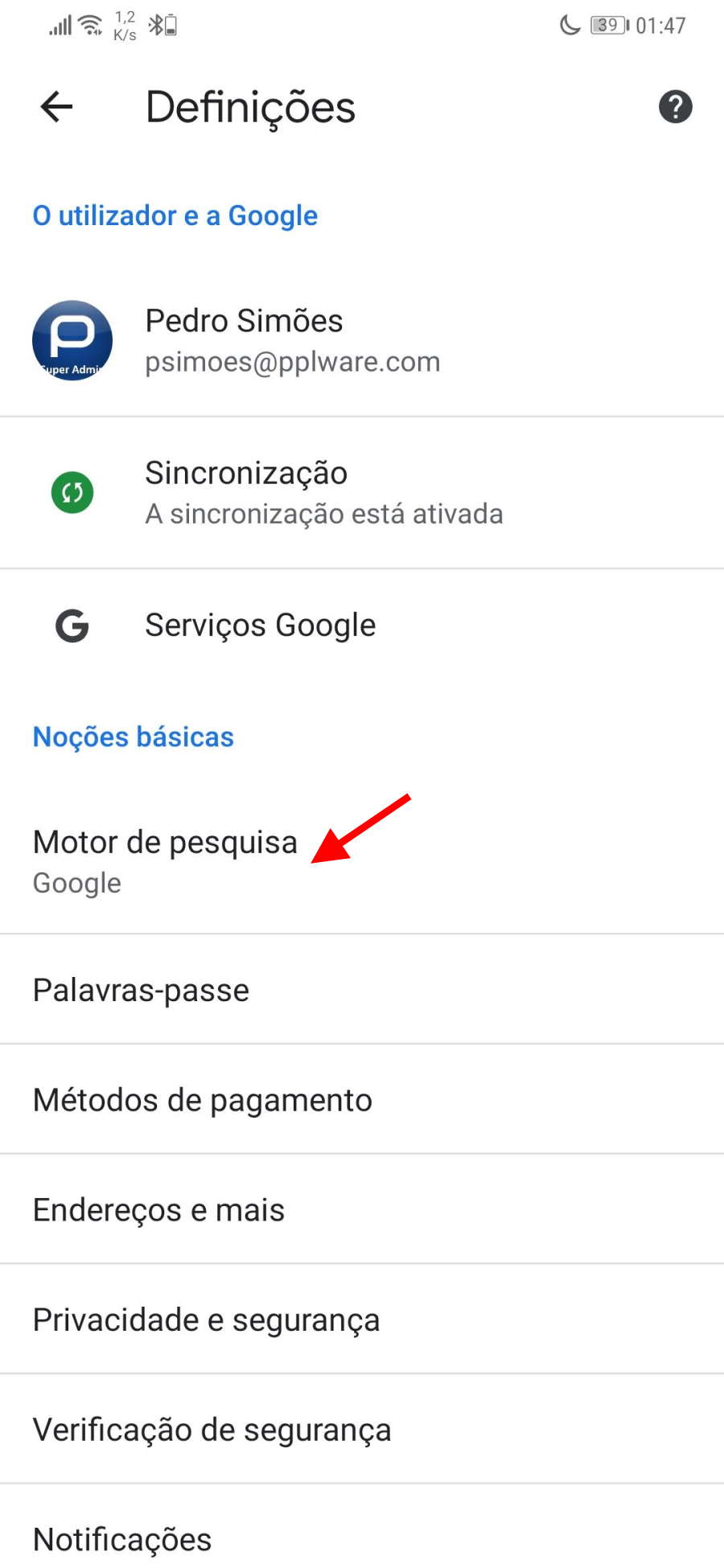
From Chrome's list of configuration options, they should choose the option called Search Engine. This is located at the top, in the Essentials area, so it's easy to find and access by the user.

Google Chrome Android Search Engine


Now they have a list of browsers available in Chrome. They just need to choose the search engine they want to use and it's active right away. They can also change the location permissions and which notifications are allowed.

From that point on, everything they type into the address bar will be searched for. So far it was using Google, but it started using what they specified before. Try it out and get more privacy and Other improvementss, just to change the Chrome search engine on Android

CrystalNomad

“Friendly zombie fanatic. Analyst. Coffee buff. Professional music specialist. Communicator.”

CrystalNomad

CrystalNomad

"Friendly zombie fanatic. Analyst. Coffee buff. Professional music specialist. Communicator."

Next Post
A BOLA – Griezmann assumes he feels more free in the national team and talks about his relationship with Messi (Barcelona)

A BOLA - Griezmann assumes he feels more free in the national team and talks about his relationship with Messi (Barcelona)

Leave a Reply Cancel reply

Your email address will not be published. Required fields are marked *

Navigate

  • Home
  • Top News
  • World
  • Economy
  • science
  • Technology
  • sport
  • entertainment
  • Contact Form

Pages

  • About Us
  • Privacy Policy
  • DMCA
  • Editorial Policy
  • Contact Form
  • About Us
  • Privacy Policy
  • DMCA
  • Editorial Policy
  • Contact Form

© 2025 JNews - Premium WordPress news & magazine theme by Jegtheme.

Welcome Back!

Login to your account below

Forgotten Password?

Retrieve your password

Please enter your username or email address to reset your password.

Log In
No Result
View All Result
  • About Us
  • Contact Form
  • DMCA
  • Editorial Policy
  • Privacy Policy

© 2025 JNews - Premium WordPress news & magazine theme by Jegtheme.