
For greater productivity, it is recommended to improve workflow, with no time leakage and tidy IT environment. Now, among the countless Google Chrome extensions, we are showing you five of them, which can be very useful in daily life.
Chrome extensions to increase productivity
If you are a Google Chrome user, and even more so, have a habit of exploring it, you will know that the extension store is almost endless, offering a series of solutions for all tastes. Now, it's clear that with the popularity of productivity, there's no shortage of accessories to boost it.
We've explored 'Narnia' and shown you five extensions that will definitely make your workflow more productive.
Todoist for Chrome | 4.7 ⭐
The first comes with an extension, so in addition to the extension for Chrome itself, there is also an extension for Gmail.

This extension is used by millions of people and, as the name suggests, lists things and writes tasks in a list format, simplifying consultation and workflow.
More than just writing assignments, the extension lets you add pages to your reading list, among other things.
Online PDF Tools - ilovepdf.com | 4.6⭐
This Chrome extension ensures instant access to a series of tools related to the PDF file.

It allows you to simply export, compress, extract and edit images or pages, among other features.
If you're constantly searching for these types of tools, this extension could be a way to always have them at your fingertips.
Color picker for Chrome | 4.0⭐
Depending on your profession, this could be a great ally in your daily life.

Using this extension, you can, in a very simple way, access the HEX and RGB codes of a specific element, without resorting to screen cropping and extensive searches.
Although this alternative is more complete, the process using Color Picker is very simple and intuitive, and serves its purpose perfectly.
Save the image to Google Images | 4.1⭐
This tool can also be very useful, as it makes it easier to save images to Google Photos.

In a practical way, after linking the extension to your Google Photos account, you can add any photo you want to your gallery, simply by clicking on the right side of the mouse.
Like the tool we have provided here, this extension saves the photo or image directly to your Google Photos account. When you save the content, a notification will appear that the image has been saved and you will quickly get it in your gallery.
Save the image to Google Images
Page Marker - Web Drawing | 4.0⭐
With this extension, you can mark up, underline and "scribble" any web page.
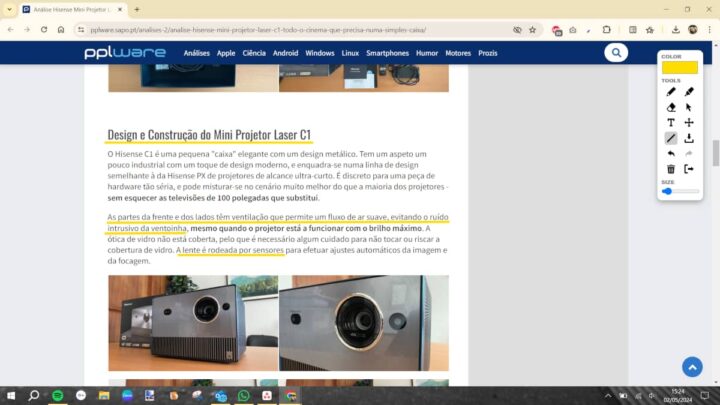
More than Scribble, you can download what you have underlined or highlighted, in a very simple way.
It serves a series of purposes, and can be very useful, making work easier, without the need for screenshots or printouts.
Save the image to Google Images
Since it has a huge catalog, it is possible that there are other extensions for these and other production purposes. Leave your suggestion in the comments if you use something different.

“Friendly zombie fanatic. Analyst. Coffee buff. Professional music specialist. Communicator.”